

Conversational AI
An office that fits in any browser. With doors you can close
EVI is the internal communication platform for your team.
Departments and groups, channels, audio and video calls and real rooms: conference rooms, breakout rooms, quiet zones and arenas. Plus a personal concierge that answers questions with your company’s knowledge.
Private hosting available
Six sentences
Chat here, video calls there, knowledge somewhere else
And nobody knows who is free right now. Almost every team that works hybrid knows these six sentences.
“Every conversation needs a meeting invite and a link.”
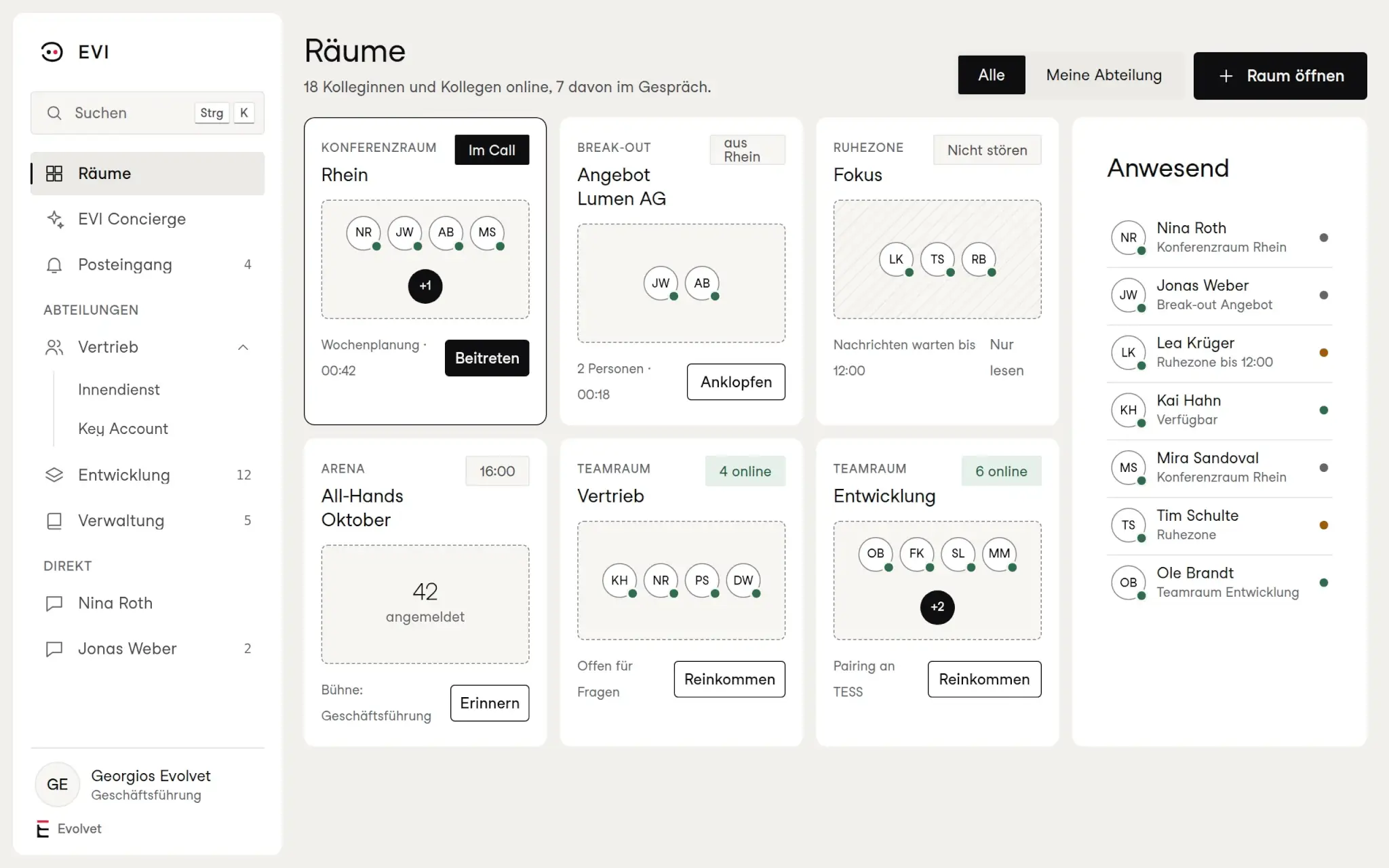
In EVI you simply walk into the room. You can see straight away who is in the conference room or the team room, and you join like you would in the office.
“I never know whether it is all right to interrupt.”
Presence shows who is available, who is in a conversation and who has gone to a quiet zone.
“Big meetings drag, small questions get lost.”
Breakout rooms split a meeting into small groups and bring everyone back with one click.
“Chat, calls and documents live in different tools.”
Channels, direct messages, audio and video calls and files sit in one place, organised by departments and groups.
“Announcements to everyone vanish in the chat history.”
Arenas are built for the big moments: all-hands, staff meetings, presentations to the whole team.
“Before I find anything, I would rather ask a colleague.”
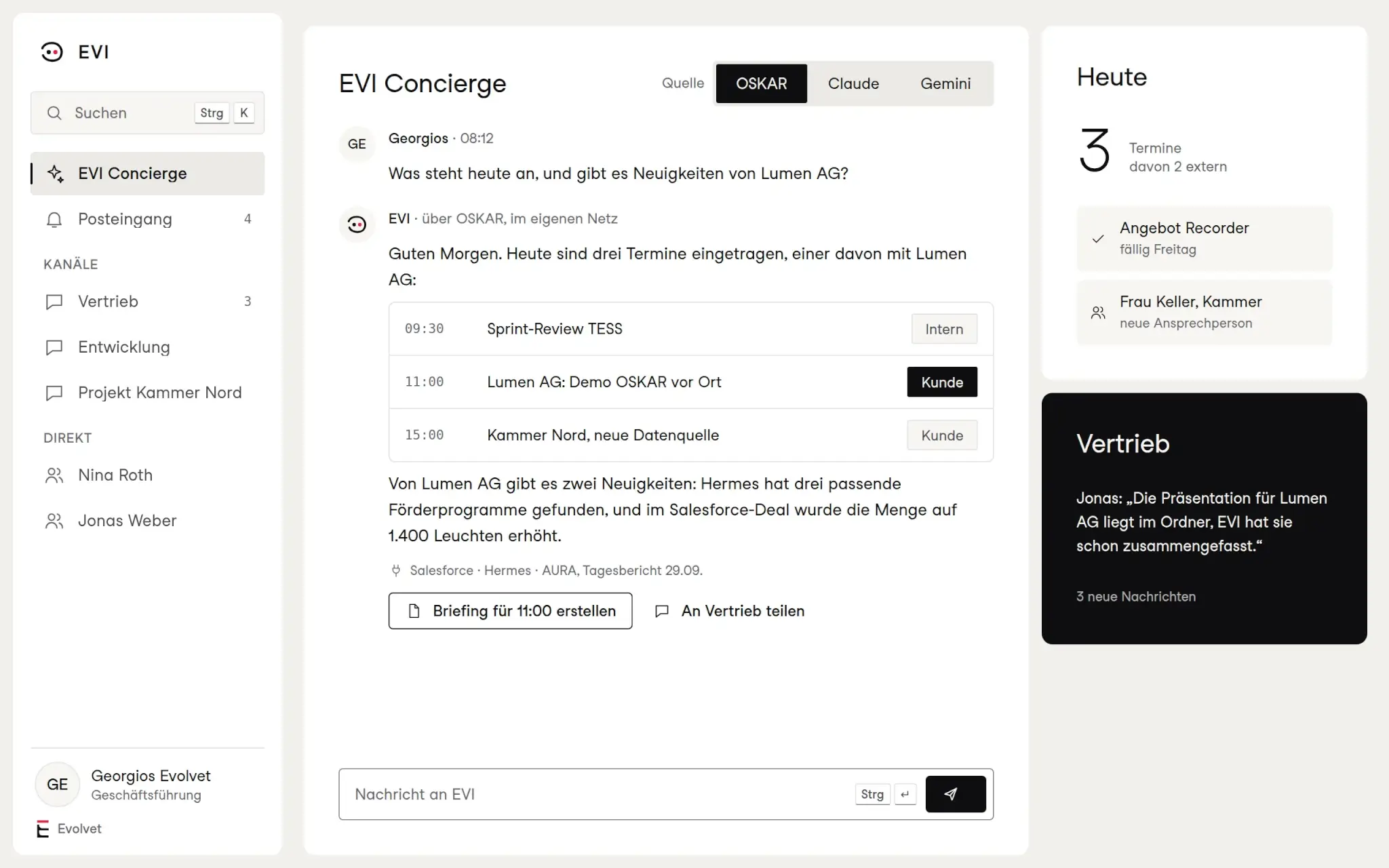
The EVI Concierge answers questions about clients, appointments and workflows, and names its sources.
How it works
Three things EVI brings together
- 1
Rooms
Conference rooms for meetings, breakout rooms for small groups, quiet zones for focused work and arenas for big events. Every room shows who is in it.
- 2
Conversations
Channels per department and group, direct messages, threads, files. Any channel becomes an audio or video call with one click.
- 3
Concierge
Your personal AI in EVI. It knows your day, summarises, drafts replies and pulls information from NEVA, OSKAR and your systems.
Room overview
The room overview is your team’s digital office. It shows at a glance where people are talking, where someone is focusing and where you can simply join. Team rooms are open for questions, quiet zones hold back messages, and the next arena is already announced.
- Conference rooms
- For meetings with audio, video and screen
- Team rooms
- Per department, open for quick questions
- Quiet zones
- Visibly present, but not to be disturbed
- Arenas
- For all-hands and large meetings
Calls
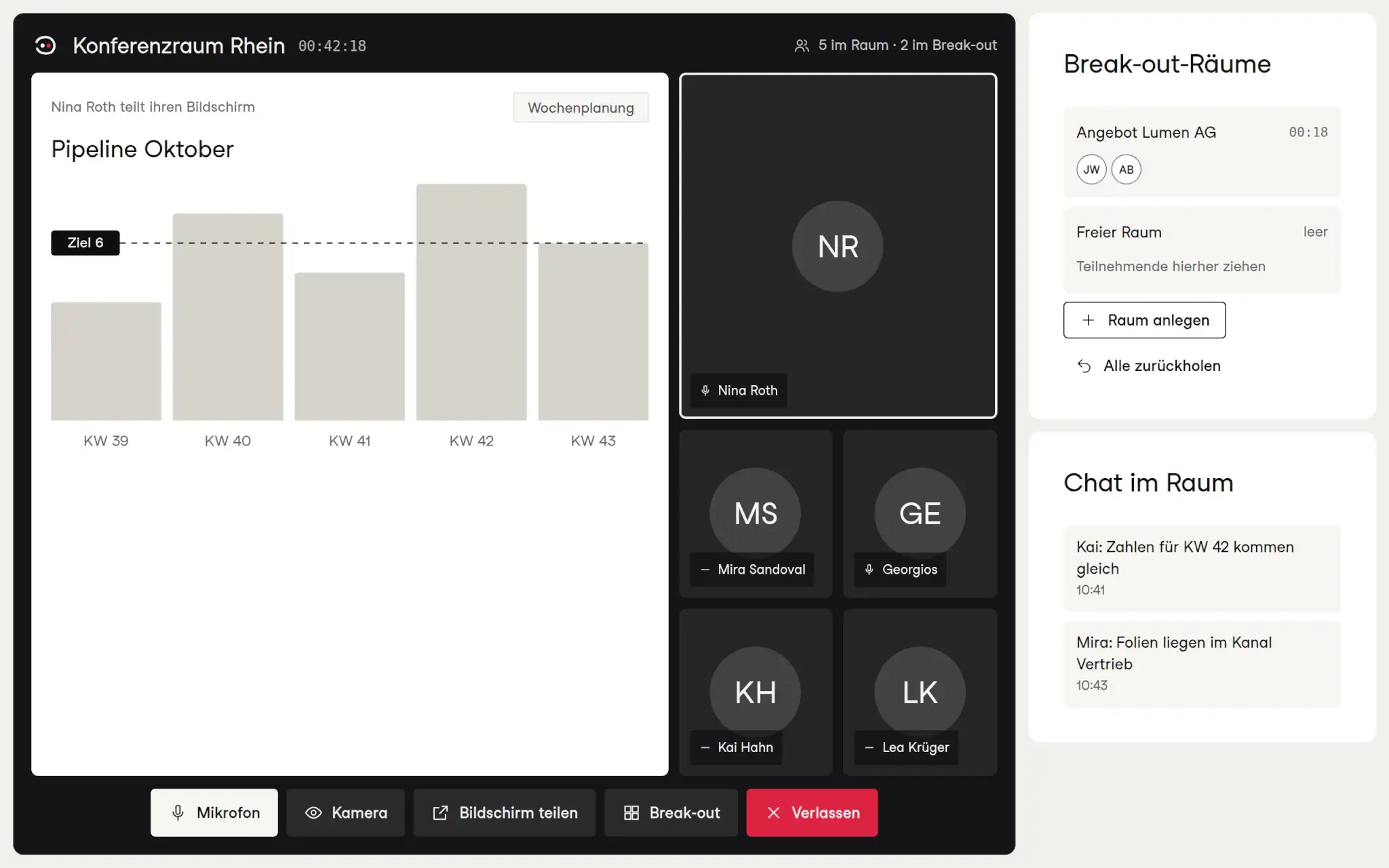
Audio and video calls run directly in EVI, in a room or from a channel. If you want to show something, you share your screen. If the group gets too big, breakout rooms split the team into small groups and bring everyone back with one click.
- Calls
- Audio and video, in a room or a channel
- Screen
- Share with everyone in the room
- Breakout
- Create small groups, bring them back with a click
- Room chat
- For links, figures and questions on the side
Departments and groups
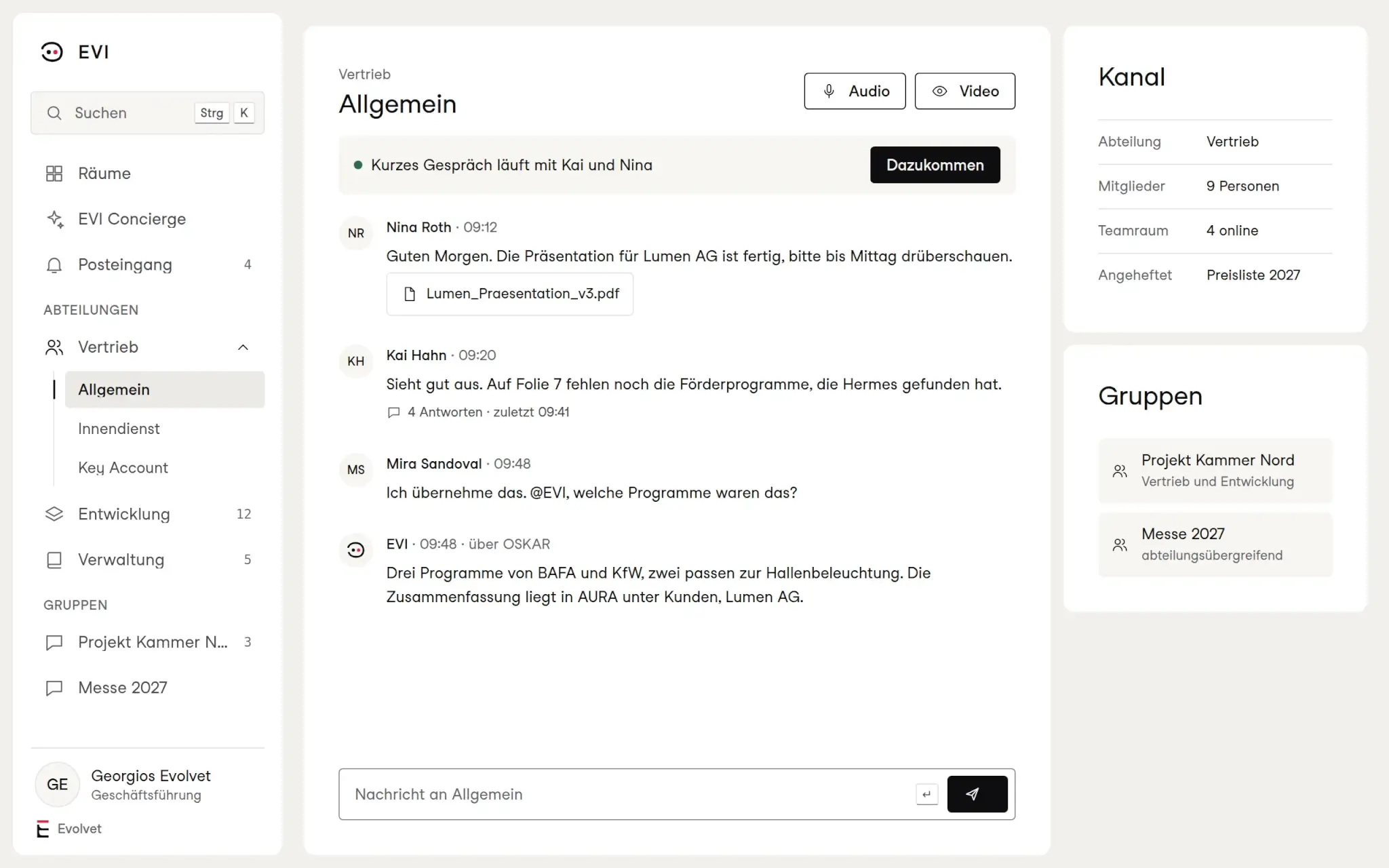
EVI mirrors your company the way it works: departments with their channels, and groups that cut across them, for a project or a trade fair, say. New colleagues see straight away where they belong and who they can talk to there.
- Departments
- With their own channels and team rooms
- Groups
- Across departments, for projects
- Messages
- Threads, files, direct messages
- From a channel
- Audio or video with one click
Concierge
The EVI Concierge knows your appointments, summarises channels, prepares briefings and drafts replies. It pulls information from NEVA, from OSKAR and from connected systems, and it names the source for every answer. You decide which AI works behind it.
- Daily overview
- Appointments, tasks and news
- Briefings
- Preparation for meetings and clients
- Sources
- NEVA, OSKAR and your systems
- AI source
- OSKAR in your own network, Claude or Gemini
Who it is for
Who EVI is built for
Hybrid teams
Close without commuting
Working from home still means being in the room. Quick questions do not need a meeting.
Department leads
Meetings that work
Discussion in the conference room, work in breakout rooms, results back in the channel.
Management
Reach everyone
In the arena, management speaks to the whole company. The concierge prepares the day.
Control
Internal conversations belong in-house. That is why you decide which AI the concierge uses and which knowledge it may access
Private hosting
AI in your own network
With OSKAR as the source, the AI runs on your own hardware. Questions and answers never leave the building.
Cloud AI
Claude or Gemini
If you would rather not run your own hardware, connect the concierge to a cloud AI. You can change the choice at any time.
Knowledge
Only what you may see
When the concierge pulls knowledge from NEVA, the permissions of the person asking apply. What they may not see, they will not get as an answer.
Organisation
Departments and groups
Channels and rooms belong to departments or groups. So everyone sees the conversations that belong to their work.
Working together
EVI works on its own. And even better with the other platforms
 OSKAR
 NEVA
 TESS
Questions
What people often ask
What can EVI do that an ordinary team chat cannot?
EVI combines chat with rooms. You can see who is where, join conversations like in the office, split meetings into breakout rooms and reach the whole company in arenas. On top of that comes the concierge with your company’s knowledge.
What is a quiet zone?
A room for focused work. Whoever is in it stays visible to the team but is not interrupted. Messages wait until they leave the quiet zone.
Which AI does the concierge use?
Either OSKAR in your own network or a cloud AI such as Claude or Gemini. You decide.
Can the concierge see all information?
No. When it pulls knowledge from NEVA, the permissions of the person asking apply. It only answers with what that person may see.
Do we also need NEVA and OSKAR?
No. EVI works on its own as a communication platform. With NEVA and OSKAR, the concierge can access your company’s knowledge and systems.
The office stays. The way there just gets shorter

“In the workshop, every team realises it already knows its workflow. We just help write it down so that a system can run it.”